
IObit Malware Fighter 7 Pro review
IObit Malware Fighter is the antivirus program for Windows OS, designed specifically to fence off harmful activities, to protect personal data, ensure safe web browsing. It is capable of blocking programs without digital certificates, detecting and removing trojans, keyloggers, bots, worms, spyware, adware, and other malware, as well as protecting a home page and a default search engine against suspicious plugins, URLs and download files. If you’re familiar with what WannaCry and Petya are, this IObit product might be what you need.
There are 2 versions: IObit Malware Fighter Free and Malware Fighter Pro, free and paid respectively. Free version has basic features for PC scanning and safe browsing, while Pro is extended with things like real-time mode, web camera protection, separate file storage, 24/7 support and more. It costs $20 per 1 year and 1 PC. We’ll look closer into differences of both versions later on. IMF offers 33 languages of menu to choose from.
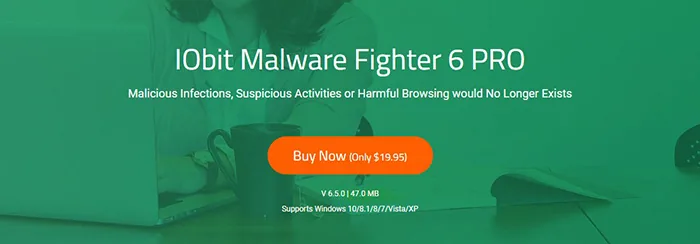
Specifications
| Vendor | IObit (website) |
| Newest version (for Windows) | v.6.6.1.5153 out April 2019 |
| Operating systems | Windows 7/8/8.1/10 |
| Installer file size | 39.2 MB |
| Menu languages | 32 |
| Key modules | Anti-malware, Anti-ransomware, Anti-mining |
| Extra features | BitDefender engine, Protected Storage, Webcam Protection |
| License | Free / Subscription |
| Pricing | $25.99 Pro (1 Year, 1 PC) |
Free vs Pro
The first beta version 1.0 was released in 2010. The application had several tools to guard system modules and files. Since then, IObit has been upgrading the product adding more features, say for example, the anti-ransomware engine by Bitdefender or webcam protection. Current Malware Fighter 6 version, released in 2018, comes with lots more.
For smooth running of this anti-malware program, the following systems requirements are recommended:
- OS: Windows XP/Vista/7/8/8.1/10
- Processor: 1 Ghz or higher
- Memory (RAM): 1 GB
- Disk space: 1 GB
- Screen resolution: 1024*768 or above
Let’s now compare Free and Pro versions and highlight key capabilities of IMF.
| Free | Pro | |
| Price (1-year subscription, 1 PC) | $0 | $19,95 |
| Protection against malicious files | ✓ | ✓ |
| Advanced protection by BitDefender engine | - | ✓ |
| Database of ransomware | - | ✓ |
| Separate file storage with reinforced defense | - | ✓ |
| Basic real-time protection | ✓ | ✓ |
| Complex real-time protection for maximum PC protection | - | ✓ |
| Anti-ransomware check at system boot | - | ✓ |
| Camera protection | - | ✓ |
| USB-drive virus protection | - | ✓ |
| Detection of files/processes impacting RAM negatively | - | ✓ |
| Automatic removal of web activity traces | - | ✓ |
| Anti-mining, pop-ups blocking | ✓ | ✓ |
| Home page and DNS protection | ✓ | ✓ |
| Automatic upgrades | - | ✓ |
| 24/7 technical support | - | ✓ |
Installation & activation
To start off, go to IObit website, Products tab and from there click Protection to find Malware Fighter, free or Pro. There, click the green Download button, get the installer file and run it. On “custom install” pop-up window select a folder to place the program, check/uncheck “create desktop icon” and hit Install. In a matter of seconds, users are offered a newsletter subscription, which is optional, and then the process is complete.
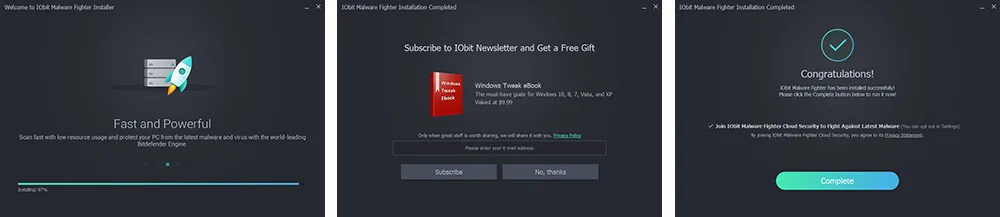
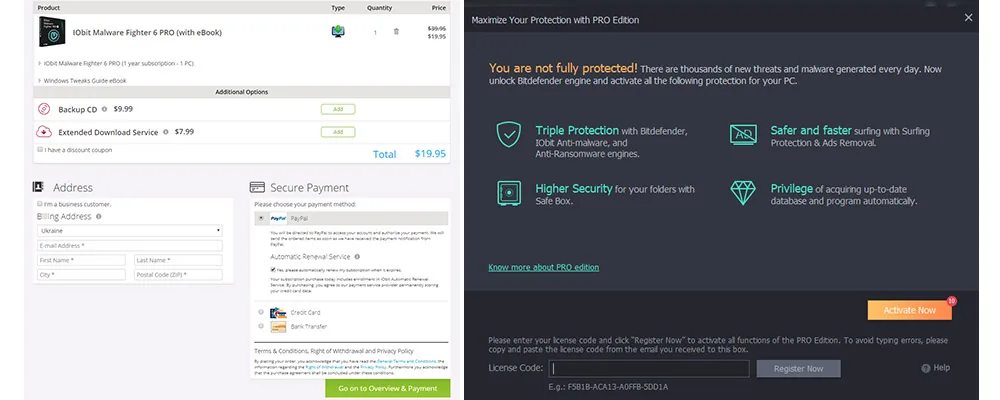
Moments after, a new browser window is opened prompting you to buy a subscription. You can just skip that if you want to try out a Malware Fighter free first. If you’re ready for purchase as is, then click Buy Now on IObit Malware Fighter PRO page, select additional options if you like, specify payment option (PayPal, credit card, bank transfer), enter email and confirm the purchase. You’ll get the license key sent over email. Afterwards, start the app and navigate to Enter Code link in the bottom right part, click it and enter the key to use IMF Pro.
Scanning types, features, interface
“Your PC has never been scanned” is the first greeting message in Malware Fighter. And you can run smart (fast) scanning right away - click the Scan Now button. To initiate protection, turn on/off 2 guard modes: Anti-ransomware Engine and Bitdefender Engine at the bottom of the screen. Both are available in Pro version only. For settings, go to Options in the upper right corner.
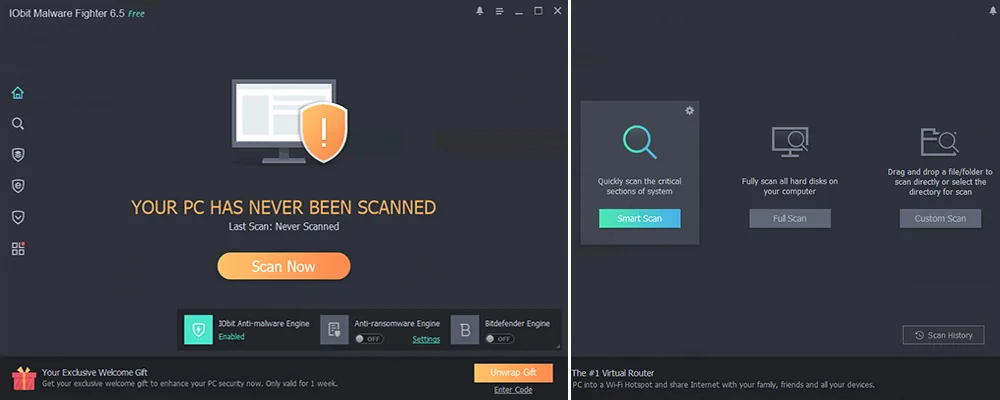
After all set up, head to Scan tab in the left menu and select one of three scanning types: Smart Scan, Full Scan, or Custom Scan. Smart scan is for quick system check aimed to detect virus files and errors. Full scan implies holistic, deep and precise system scanning and it will usually take quite some time. A third one, Custom scan is a selective check - choose certain system areas to scan separately.
We’ll see how all of those scan types perform in few moments, but now let’s see what else is under the hood. IObit Malware Fighter Pro review wouldn’t be full, if we hadn’t talked about its real-time protection tool. So, Real-time protection mode is in place to monitor startup programs, browser activities, web pages and files a user opens. If we take a jab at famous US police slogan “To serve and protect”, IMF’s motto would then be “To detect and remove”.
Anti-ransomware aspect adds up to that purpose, detecting spyware / malware / adware. Surfing protection is the next tool in line aiming to prevent access to malicious or suspicious URLs. Key tools here are anti-tracking, download guard, DNS protection, plugin/toolbar cleaner, ad block. Malware Fighter v.6.5.0 contains the ever growing database of identified threats and sources, counting over 2 million.
By heading to Ransomware Guard tab, you have access to anti-ransomware engine and Safe Box modes - both available only in Pro. Safe Box is the special option/tool to protect certain folders from unauthorized access.

Next up, we have the Security Guard tab, to monitor several types of activities on user’s PC or laptop:
- Network Guard - blocks web pages that may contain threats.
- MBR Guard - against cryptographic attacks targeting MBR (master boot record), e.g. GoldenEye or Petya malware.
- File Guard - scans incoming unknown files.
- Camera Guard - protects camera from unauthorized access.
- Startup Guard - against unauthorized programs trying to run at startup (only in Pro).
- USB Disk Guard - scans USB drives for viruses.
- Process Guard - detects malicious processes impacting RAM.
- Malicious Action - analyzes and identifies malicious actions.
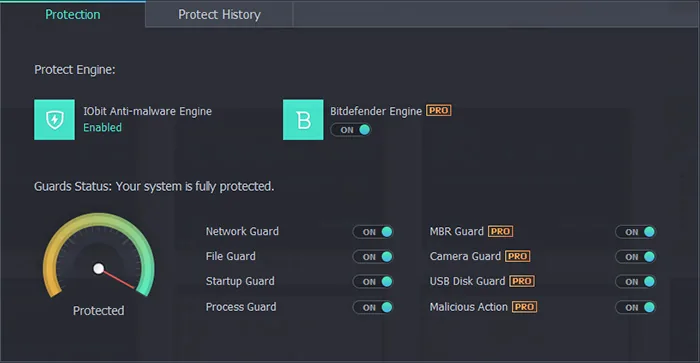
The last Action Center tab focuses on system optimization, including tools like defragmentation, backups, uninstaller, etc. Overall, the interface of Malware Fighter Pro is up to date, visually appealing and easy to navigate. It has a dark background with red and green elements - distinguishing areas that are protected from those that are not. All features and tools are divided into different tabs.
How to uninstall Malware Fighter
To uninstall IMF on Windows 8 or earlier versions:
- Open Start menu and select Control Panel
- Click Uninstall a program
- Locate IObit Malware Fighter 6 and select Uninstall
- Follow on-screen prompts
- Restart PC to complete program removal
To uninstall IMF on Windows 10:
- Open Start menu and click on Settings
- Select System or Apps in Settings, select “Programs and Features” or “Apps and Features” from the left panel
- Locate IObit Malware Fighter 6 and select Uninstall
- Follow on-screen prompts
- Restart PC to complete program removal
Performance testing
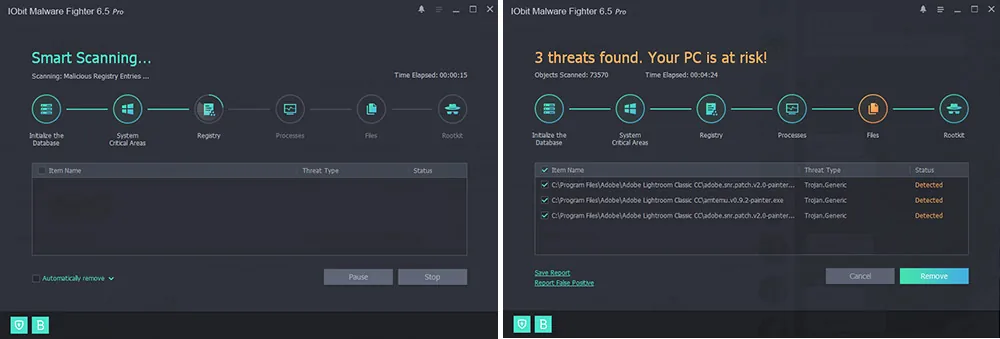
We tested Malware Fighter on a standard Windows 10 PC with 16GB RAM. First, we ran all three scans. With Smart scanning that lasted about 5 minutes, the program found 3 threats - all identified as “trojan generic” type. Number of objects checked: 73,570.
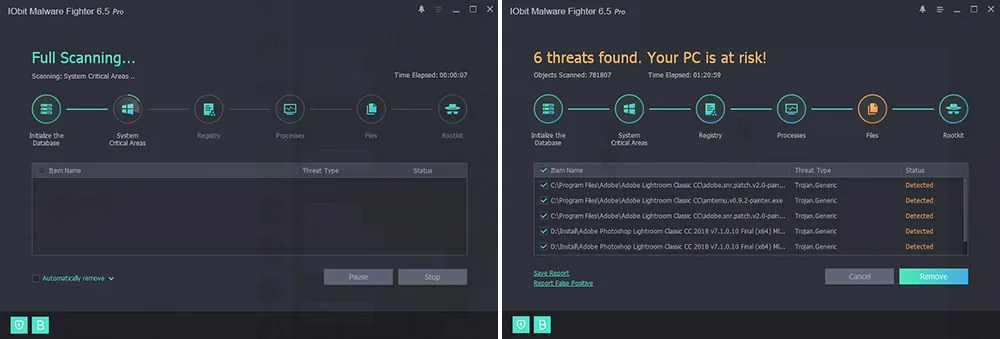
Full scanning took 1 hour and 21 minutes, went through 781,807 files, and identified 6 threats, again all Trojan type. We should note, all of those threats were related to Adobe products, which is somewhat strange.
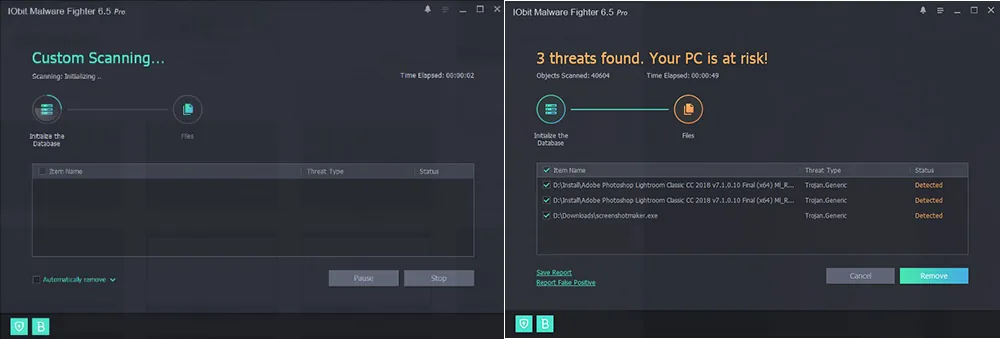
For Custom scanning we chose the 1 TB hard drive with 40,000 files in it. It found 3 threats (a screenshot making app along with Adobe, again), but more strikingly the process lasted 49 seconds - which we can neither explain nor apprehend.
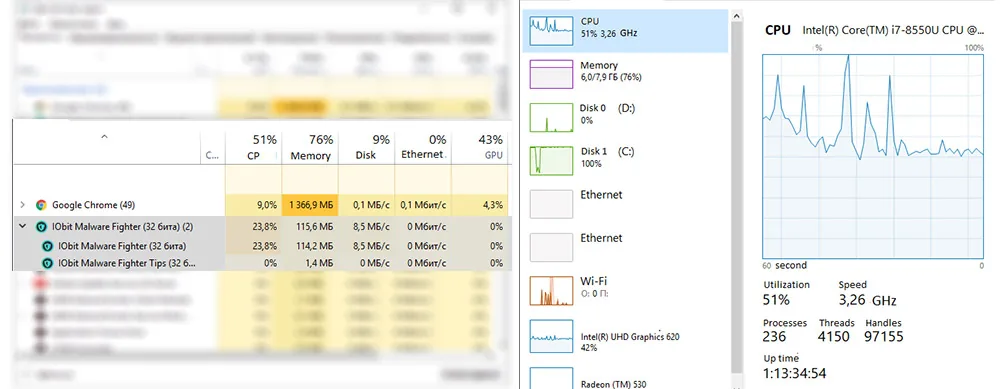
Nevertheless, we also checked the impact on PC resources. With few programs running (Chrome, IMF, Windows Explorer, Adobe Acrobat, Task manager), CPU load was at 51%. Out of that, Malware Fighter’s part was 23,8% and 115 MB of memory. Is it a lot or not - it depends.
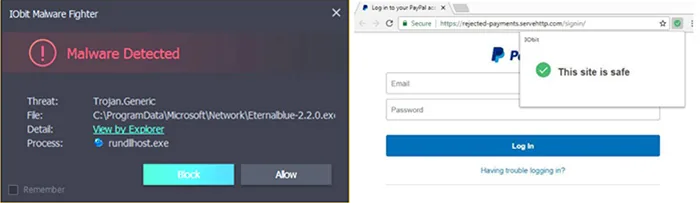
Finally, during our 5-day use of this anti-malware program by IObit, we’ve also got some mixed signals regarding real-time protection capabilities. On one hand, it successfully detected some malware files (see the left part of screen below), while on the other hand, it wasn’t much efficient against malware-hosting URLs - it did not prevent access to those, instead marking them as safe (see the right part of screen below).
Pricing, (no) trial and free version
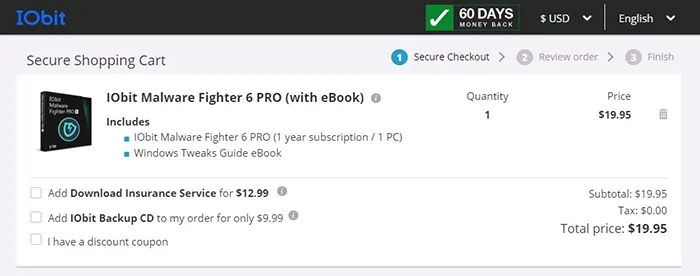
IObit offers a free version of Malware Fighter, however, it is limited in functionality. Modules like Anti-tracking, Camera Guard, USB Disk Guard, Auto scan, etc. are available in Pro version only. You can buy the program for $19.95 as a one-year subscription for one PC. Curiously enough, there is no trial of full-featured version, so users have to rely on a free Malware Fighter version, but good news is there’s a 60-day money-back assurance from the vendor. Although, be sure to read Refund policy carefully, if you want to count on that.
Malware Fighter: Pros & Cons
- Three scan modes
- Free version with basic features
- Rich functionality in Pro version
- User-friendly interface, many languages
- Regular database updates
- Free version offers very little
- Ads of other products by IObit
- Only 1-year pricing that has to be renewed later
- No mobile app
FAQ
What does Malware Fighter protect from?
It blocks all types of malware surely, but there’s also web surfing protection, ads removal, protection against phishing websites, cryptomining, ransomware.
Is Malware Fighter a scanner?
It has various scan modes, but it is rather a real-time protection software than a passive scanner.
Can I use Malware Fighter for web surfing?
Sure, it offers powerful browser protection options for homepages, search, downloads, DNS, phishing sites, toolbars, plugins, ad removal, as well as anti-tracking.
What is the difference between Free and Pro versions?
Free version offers basic protection (incl.real-time, anti-mining, homepage, DNS). Malware Fighter Pro also provides Bitdefender engine, anti-ransomware, anti-tracking and more features.
Is Malware Fighter Free any good?
It provides decent protection, while not forcing users to purchase Pro version.
Can Malware Fighter guard private data?
Yes, there is the Safe box feature, that allows to protect files by password.
Can Malware Fighter protect a webcam?
Yes, it can safeguard camera against unauthorized access, among its other capabilities.
Does Malware Fighter update its database automatically?
It does not update in a free version, only manual option. However, Malware Fighter Pro provides such feature.
Malware Fighter did not find threats, but certain files still seem suspicious
something
Is IObit Malware Fighter safe?
Yes. It contains 2 antivirus engines to minimize false alarms.