
Deleted the wrong folder, emptied the Recycle Bin, or pulled a USB stick out too early? That is the moment data recovery software earns its keep. In our roundup of free data recovery tools we put a set of undelete utilities through the same simple test, and now it is the turn of one of the best-known names in the field: Stellar Data Recovery for Windows.
Rather than repeat the vendor’s feature list, we installed the free edition on a Windows 11 PC, deleted the same 50 test files from two different USB flash drives, and checked what came back – not just by counting files, but by comparing every recovered file with the original, byte for byte. Here is what we found, plus what the paid Standard, Professional and Technician editions add.
Specifications
| Vendor | Stellar Information Technology, visit site |
|---|---|
| Version tested | Stellar Data Recovery Free Edition 14.0.0.0 (November 2026) |
| Operating systems | Windows 11, 10, 8.1, 8; Windows Server 2022, 2019, 2016 (a separate Mac version exists) |
| File systems | NTFS, exFAT, FAT16, FAT32 |
| Installer file size | 193.6 MB |
| Disk space after install | ~577 MB (546.8 MB app + 29.8 MB Stellar Codec Pack) |
| Scan modes | Quick scan, Deep Scan (file-signature search) |
| Free version | Full scan and preview, recovery of up to 1 GB in total |
| Paid editions | Standard from $59.99/year, Professional $89.99/year, Technician (RAID) – lifetime licenses available |
What is Stellar Data Recovery?
Stellar Data Recovery is a file recovery program for Windows from Stellar Information Technology, an Indian company that has been building data recovery tools for three decades. It restores deleted documents, photos, videos, audio and email files from internal and external hard drives, SSDs, USB flash drives and memory cards, and the higher editions go further – recovering data from a PC that no longer boots, repairing corrupted photos and videos, and rebuilding RAID arrays.
All editions share one program: the free download is the same 14.0 build, and a license key simply unlocks more. That makes the free edition a fair way to judge the Professional one – the scanning engine is identical, only the recovery allowance and some tools are locked.
How we tested
We used the same method as in our data recovery roundup: 50 files of five kinds – 12 pictures (JPG, PNG, BMP, GIF), 8 videos (MP4, AVI), 12 documents (DOCX, XLSX, PDF, TXT, CSV), 10 applications (Windows EXE files) and 8 archives (ZIP, TAR.GZ), 824.5 MB in total. We copied them to a USB stick, verified each copy with a SHA-256 checksum, deleted them, and then let Stellar Data Recovery try to bring them back to the PC’s SSD.
We ran the test twice, on two FAT32 flash drives:
- Test 1 – a 29 GB USB 3.0 stick that already held 5.4 GB of other files (a Windows installation drive, which we left untouched).
- Test 2 – an empty 115 GB Kingston DataTraveler 3.0, the classic “I just deleted everything” scenario.
#1: Installation
The 193.6 MB installer is digitally signed by Stellar Information Technology Private Limited (DigiCert certificate), so Windows identifies the publisher correctly. Installation took 34 seconds and put about 577 MB on the system drive, including a companion component called Stellar Codec Pack (29.8 MB). That is a lot for a recovery tool – many free undelete utilities need under 50 MB – but the package also contains Stellar’s photo and video repair modules and a drive health monitor.
One thing to know: the program asks for administrator rights every time it starts. That is normal for software that reads drives sector by sector, but it means you cannot use it on a locked-down work PC without an admin password.
#2: Choosing what and where to recover
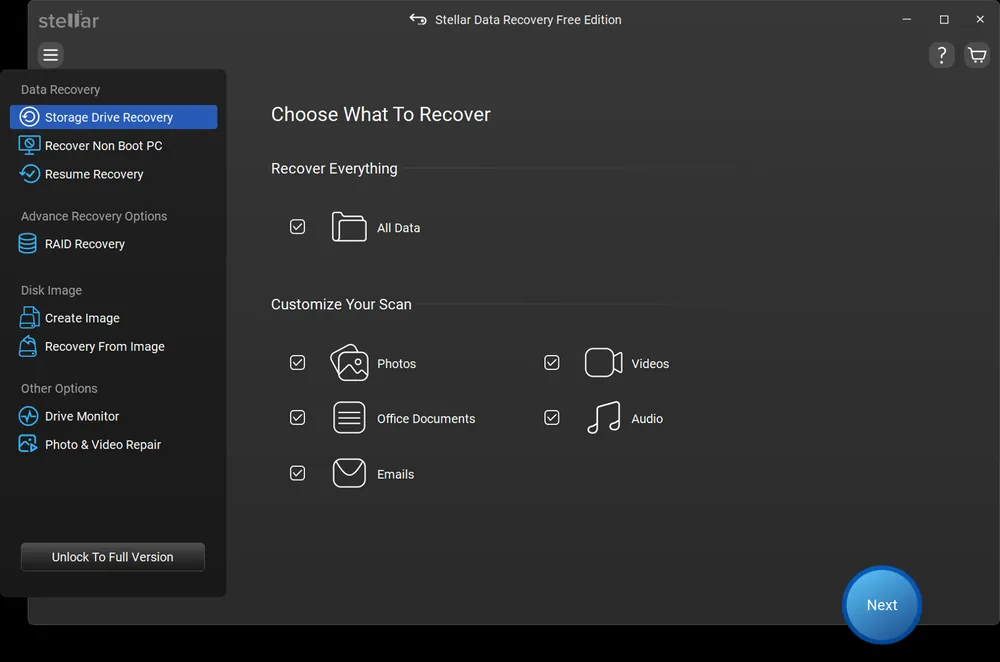
The wizard starts with Choose What To Recover: either All Data or a custom mix of Photos, Videos, Office Documents, Audio and Emails. We kept All Data on, because our set included EXE files and archives that do not belong to any of the five groups.
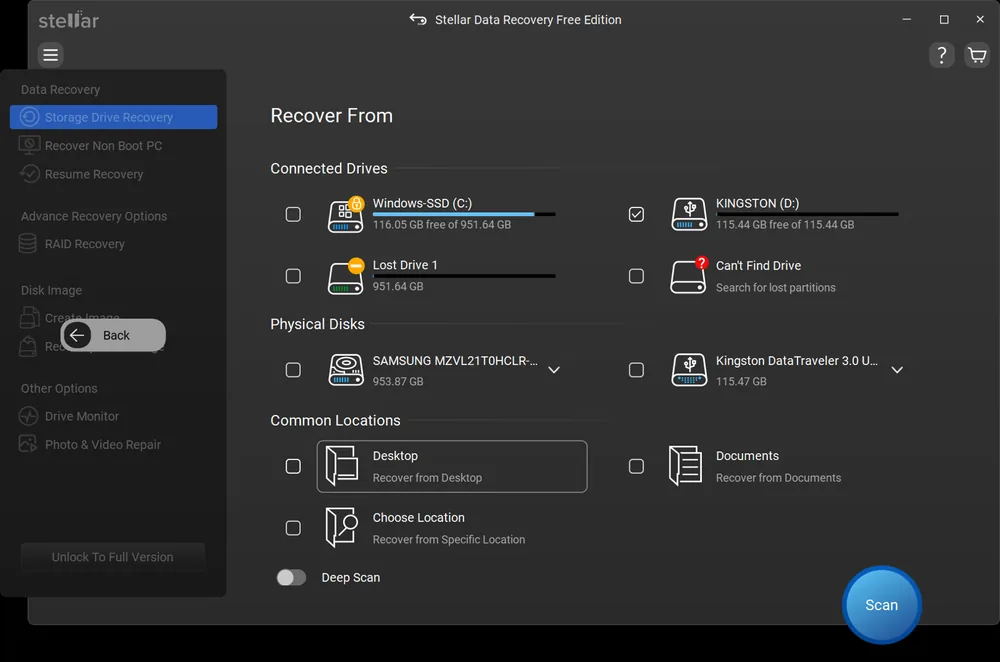
The next screen, Recover From, lists connected drives, lost partitions (“Lost Drive”), a “Can’t Find Drive” search, physical disks, and shortcuts to the Desktop, Documents or any chosen folder. Once a drive is ticked, a Deep Scan switch appears; with it off, the program runs a quick scan of the file system first.
#3: Quick scan and Deep Scan
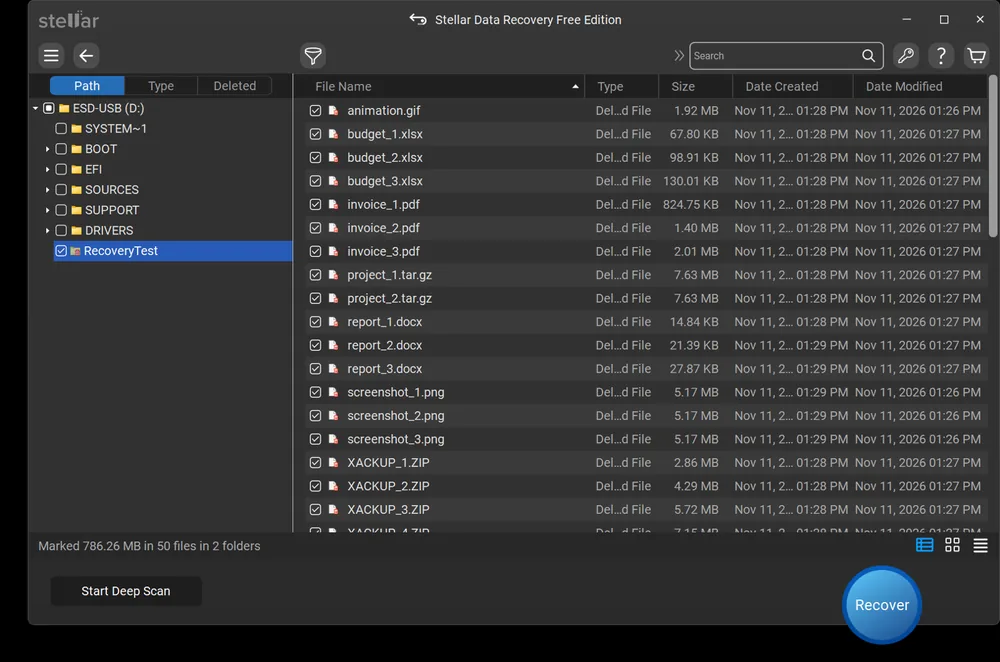
The quick scan was the stand-out result of the review: about 7 seconds on both sticks, and both times it listed all 50 deleted files inside the deleted “RecoveryTest” folder, with original sizes and dates. Results can be browsed by Path, by file Type or as a Deleted-only list, searched by name, filtered, and previewed before recovery.
A small FAT32 quirk shows up in the list: files whose names fit the old 8.3 format (like backup_1.zip or notepad.exe) lose their first letter when Windows deletes them, so Stellar shows them as XACKUP_1.ZIP or XOTEPAD.EXE. Long file names survived intact. This is how FAT works, not a Stellar bug – other undelete tools show the same.
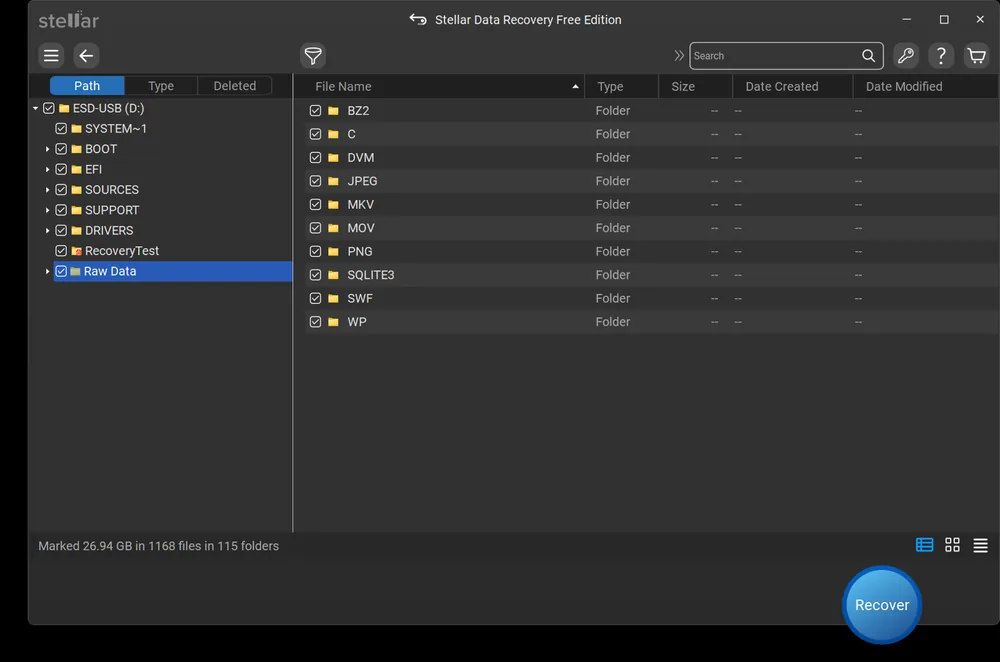
Deep Scan reads the whole drive and also looks for files by their signatures, which is what you need after formatting or when the file system is damaged. On the 29 GB stick it took 17 minutes 9 seconds and raised the count from 1,073 to 1,168 files. The extra finds land in a Raw Data folder sorted by type (JPEG, PNG, MOV, MKV, SQLITE3 and so on) – mostly fragments of older data from the stick’s past.
#4: Recovery test results
Recovery is where we went beyond counting files. After each run we compared every recovered file with the original by SHA-256 checksum – a file only counts if it is byte-for-byte identical.
| Test 1: 29 GB stick with 5.4 GB of other data | Test 2: empty 115 GB Kingston stick | |
|---|---|---|
| File system / cluster size | FAT32 / 16 KB | FAT32 / 32 KB |
| Quick scan time | ~7 sec | ~7 sec |
| Deleted files found | 50/50 | 50/50 |
| Deep Scan time | 17 min 9 sec | not needed |
| Recovery time (786 MB to SSD) | 4 min 39 sec | – |
| Files recovered intact | 35/50 | 2/2 recovered before the free 1 GB limit |
| Pictures / videos / Office docs / ZIP | all intact | videos intact |
| EXE / TXT / CSV / TAR.GZ | wrong content (15 files) | not reached |
Test 1 deserves an explanation. All pictures, videos, DOCX/XLSX/PDF files and ZIP archives came back perfectly. The 10 EXE files, two TXT files, the CSV and both TAR.GZ archives were restored with the right names and sizes – but with the wrong content inside. We traced every one of them: each contained a block of another file still living on the same stick, starting exactly at a cluster boundary. The likely cause is FAT32 itself: when Windows deletes a file on FAT32, it can lose part of the file’s starting address, and on a drive that already holds gigabytes of data the recovery tool has to guess it. Stellar guessed right for formats it can verify by their headers, and wrong for the rest – and the program still reported the recovery as successful. We did not run the other tools in our roundup on this particular drive, so we cannot say whether they would do better here.
Test 2, on an empty stick, is the situation most people face, and there the problem cannot occur: every file sits in the first gigabytes of the drive. Stellar again found all 50 files in seconds, but the free edition stopped after two videos (201 MB, both intact) with the message “1GB data recovery limit of this free version exceeded”. The 1 GB allowance is counted across sessions, not per recovery – our first test had already used 786 MB of it.
Practical tip: check a few recovered files before you wipe or reuse the source drive. A “successfully recovered” message only means the files were written – open them, or compare sizes and checksums for important data.
#5: Extra features
| Feature | What it does | Edition |
|---|---|---|
| Deep Scan | Sector-by-sector search for lost and formatted data, by file signature | Free and up |
| Partition recovery | “Can’t Find Drive” searches for deleted or lost partitions | Standard and up |
| BitLocker drive recovery | Recovers data from BitLocker-encrypted drives | Standard and up |
| Recover Non Boot PC | Bootable recovery media for a PC that won’t start | Professional and up |
| Create Image / Recovery From Image | Clone a failing drive to an image and recover from the copy | Professional and up |
| S.M.A.R.T. Drive Monitor | Hard drive health monitoring | Professional and up |
| Photo & Video Repair | Fix corrupted JPEG, RAW, MP4, MOV, AVI and other files | Professional and up |
| RAID Recovery | Recover data from RAID 0, 5 and 6 arrays, virtual RAID reconstruction | Technician |
#6: Editions and pricing
| Edition | Price (US, at time of writing) | What you get |
|---|---|---|
| Free | $0 | Scan, preview and recover up to 1 GB in total |
| Standard | $59.99/year | Unlimited recovery of documents, photos, videos and emails |
| Professional | $89.99/year | Standard + non-booting PC recovery, photo & video repair, disk imaging, S.M.A.R.T. monitor |
| Technician | higher, see vendor site | Professional + RAID recovery |
Prices change with promotions and by region – in the EU we were offered Standard at €69.99 and Professional at €89.99 per year, VAT included. Lifetime licenses are available at a higher price.
#7: Pros and cons
Pros
- Very fast quick scan – about 7 seconds on both test drives
- Found all 50 deleted files in both tests, with names and folders
- Clear step-by-step wizard, preview, search and filters
- Deep Scan for formatted and RAW drives
- Paid editions scale up to unbootable PCs, photo/video repair and RAID
Cons
- Free edition limited to 1 GB in total, not per session
- 15 of 50 files restored with wrong content on a non-empty FAT32 stick, with no warning
- Large install (~577 MB) and admin rights required
- Paid plans are yearly subscriptions unless you buy a lifetime license
Verdict
Stellar Data Recovery is fast and easy to use, and it found every deleted file we threw at it – twice. Pictures, videos and Office documents, which is what most people try to rescue, came back perfectly. The 1 GB free allowance is enough to judge the program and save a few important files; for anything bigger you will need Standard, and Professional makes sense if you also want to rescue an unbootable PC or repair damaged media. Our one reservation is the FAT32 test on a well-filled stick, where some files were restored with the wrong content without any warning – so always check recovered files before reusing the drive. Our score: 4.1 out of 5.
Looking for alternatives? See our tested list of free data recovery software, and to avoid needing recovery at all, our picks of the best backup software.
FAQ
Q: Is Stellar Data Recovery free?
A: Partly. The free edition scans, previews and recovers files without time limits, but only up to 1 GB of data in total – the allowance is counted across all recovery sessions. Paid editions start at $59.99 per year.
Q: Is Stellar Data Recovery safe?
A: Yes. The installer is digitally signed by Stellar Information Technology, and in our tests the program only read the scanned drives – the files on both USB sticks were the same before and after scanning. Always save recovered files to a different drive than the one you are recovering from.
Q: What is the difference between Stellar Data Recovery Standard and Professional?
A: Standard recovers deleted documents, photos, videos and emails without the 1 GB limit, including from lost partitions and BitLocker drives. Professional adds recovery from a PC that will not boot (via bootable media), repair of corrupted photos and videos, disk imaging and a S.M.A.R.T. drive monitor. Technician adds RAID recovery on top.
Q: How long does Stellar Data Recovery take to scan?
A: In our tests the quick scan of a USB flash drive took about 7 seconds. Deep Scan reads the whole drive and took a little over 17 minutes for a 29 GB stick; larger hard drives take proportionally longer.
Q: Can Stellar Data Recovery recover files from a formatted drive?
A: That is what Deep Scan is for: it searches the drive for files by their signatures even when the file system is gone. We did not test a formatted drive in this review, so we cannot quote a success rate.
Q: Why do some recovered file names start with an X?
A: On FAT and FAT32 drives Windows overwrites the first character of a short (8.3) file name when it deletes the file, so recovery tools have to substitute it. Long file names are kept intact. Simply rename the file after recovery.
Q: Does Stellar Data Recovery work on Mac?
A: This review covers the Windows version. Stellar sells a separate Stellar Data Recovery for Mac with a similar set of editions.
Q: Should I recover files to the same drive?
A: No. Writing recovered files to the drive you are scanning can overwrite the very data you are trying to rescue. Pick another drive as the destination – Stellar asks for one before saving.