
Bitdefender Total Security 2020 review
Bitdefender Total Security 2020 is a product by the Romanian company, Bitdefender SRL. It is an antivirus and one of the most popular anti-malware programs, providing protection against malware and other modern threats. Bitdefender runs on Windows, MacOS, iOS and Android. It costs $45 per 1 year as standard subscription, or $60 per 1 year as Family Pack. The program offers the following security services:
- real-time data protection - against viruses, worms, trojans, ransomwares, zero-day vulnerabilities, rootkits, spyware;
- behavioral detection to monitor active programs;
- web attack prevention - to block malicious/infected sites, plus anti-fraud filtering system;
- rescue mode - to detects threats that require a PC restart and consecutive cleaning;
- network threat warning - identifies suspicious activities, blocks malware or URLs associated with bot networks;
- phishing filter - to block sites disguised as valid but could retrieve financial data (passwords or credit card numbers);
- theft protection - prevents data in case of device loss or theft by remote access to it via Bitdefender Central account (only Windows version).
So we decided to take a look at this security suite, then conduct and write Bitdefender Total Security 2019 review. It is based on Windows 7, 32-bit PC.
| Vendor | Bitdefender S.r.l. (website) |
| Newest version (for Windows) | v.23.0.22 out July 2019 |
| Operating systems | Windows, MacOS, Android, iOS |
| Installer file size | 482.2 MB |
| Menu languages | 10 |
| Optimization modes | Anti-Fraud, AntiVirus, Web protection |
| Extra features | Parental control, Anti-Theft, Optimizer |
| License | Trial / Subscription |
| Pricing | $49.99 - 1 Year, 5 Devices $139.99 - 3 Years, 5 Devices |
Installation & interface
Before downloading and installing Bitdefender, make sure your system requirements are met: a) Windows 7/8/10, 2GB RAM, IE 11/Chrome 43/Mozilla 39; b) macOS Yosemite/El Capitan /Sierra/Mojave; c) iOS 10 or higher; d) Android 4.0.3. or higher, and Internet connection surely.
Note, that if there is another antivirus on your device, it will not coexist friendly with Bitdefender - you’d have to remove it totally. Also, you have to sign up and create a Bitdefender account to use the app. While doing that, you can choose trial, which is 30 days of free use. Interface is quite convenient, main left menu contains tabs like Dashboard, Quick scan, VPN, Protection, Utilities, Quick Action, etc.
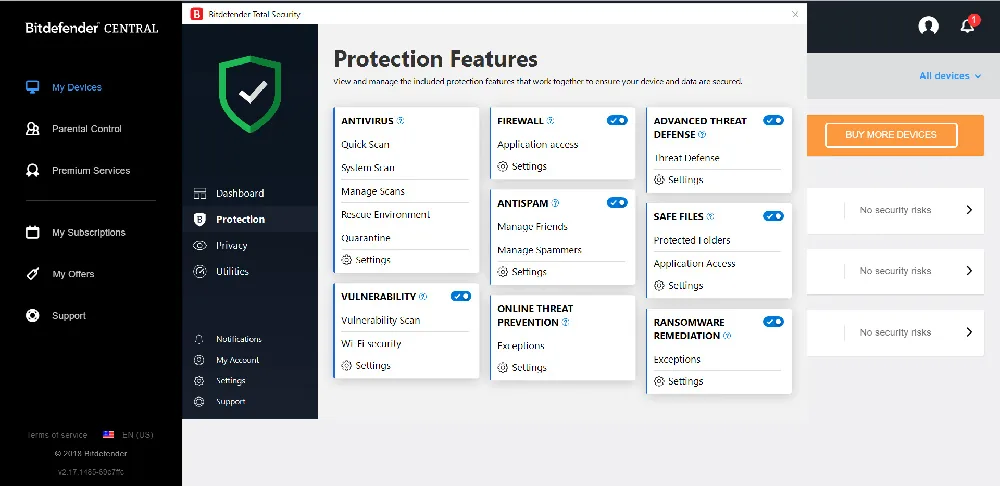
Protection is the key tab, with all security tools inside: antivirus, web protection, firewall, antispam, safe files, anti-ransomware. In Privacy tab there’s also a special Bitdefender VPN, data encryption, password protection, webcam protection, parental control. Utilities include one-click optimizer, startup optimizer, disk cleanup, anti-theft. There are few additional items in bottom part as well: notifications, account, settings, support.
How to use Bitdefender, types of scans
The program does not require significant effort. In order to perform a quick scan (to check if there are any security threats), just click on the Start Scan button in the Quick Scan menu. Users may install BTS on any other devices, managing it from personal account online.
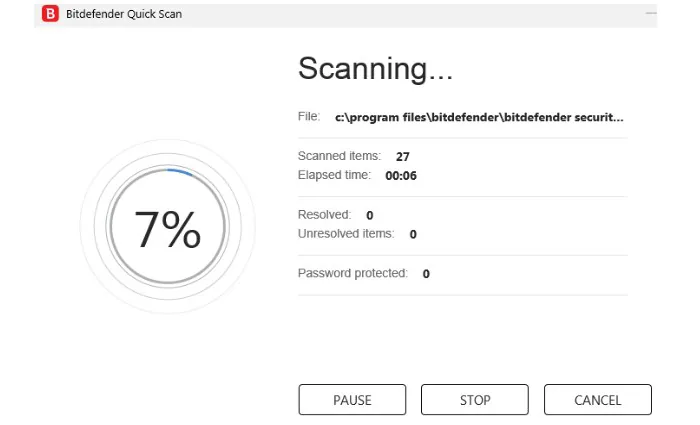 Full System Scan feature is located in Protection > Antivirus tab. In Manage Scans tab users can choose a type of scan to perform, set the frequency (schedule), specify drives/folders/files, etc. So, nothing extraordinary in line of security software. Quarantine, as you’ve guessed, holds harmful files and threats as detected by scanning.
In addition to basic tasks, there’s a bunch of useful options. For instance, Online Threat Prevention allows to avoid online fraud sites or phishing efforts, and also a user may set exceptions (URL, domain, IP) when 100% sure about legitimacy and safety. Webcam protection and parental control gain more and more significance in our day and age. One great additional feature is Bitdefender VPN (Dashboard > Open VPN) included by default in the suite with automatic or manual choice of location. We’ll probably do a separate review for it in the nearest future.
Testing the performance
Now, from theory to practice, let’s test Bitdefender Total Security 2019. Using Anti-Malware Testing Standards Organization (AMTSO) and European Institute for Computer Anti-Virus Research (EICAR) testing files, designed and certified specifically to test antivirus and security software, we ran several tests for Bitdefender.
First, we checked if Bitdefender would respond to manual downloading of a malicious file by EICAR. It did successfully: Web protection notified us about the dangerous page being blocked. Disk boot protection check found the threat as well.
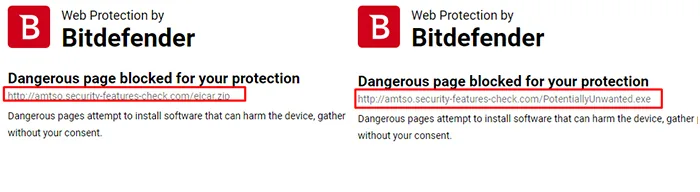
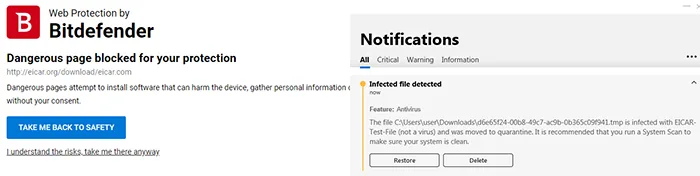 Having complicated the task with ZIP, ZIPX, RAR, 7Z, JAR, TGZ files (archived malware) we also got positive detection by Bitdefender. The same went for potentially unwanted programs (PUA) test files.
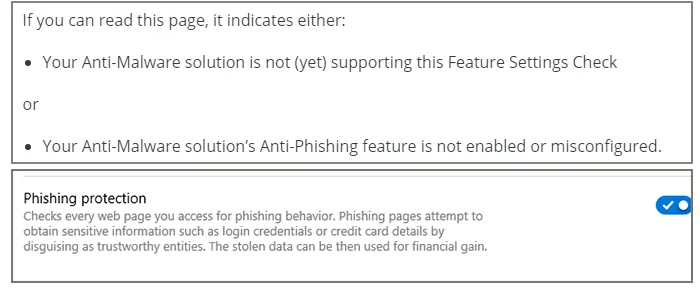
 The second stage was meant to be anti-phishing protection, though we were not able to carry it out, even after we had enabled this feature in settings.
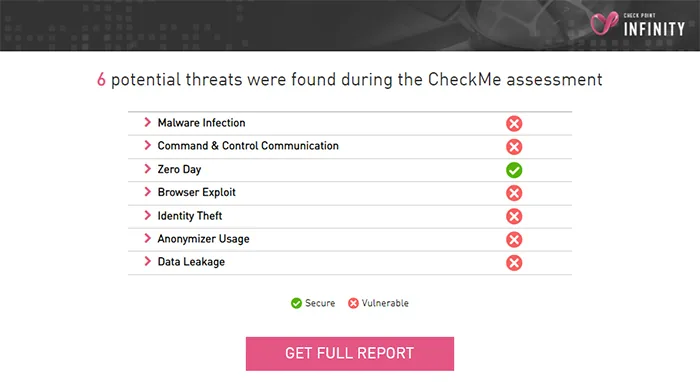
 So we moved on to next task - testing real-time protection capabilities. For this we used special threat simulations by CheckMe service. Six threats were flagged by Bitdefender: malware infection, command and control communication, browser exploitation, data leak, anonymizer use and identity theft. Although note, that these are not necessarily actual attacks, rather potentially vulnerable areas. Anyhow, BTS detected only 4.
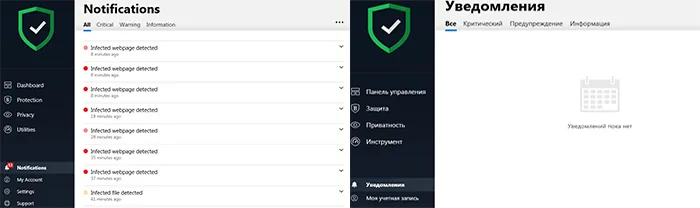
Also, isn’t it quite peculiar that after changing the language at this stage, all notifications about threats simply disappear?
 For the main test of scanning capabilities, surely enough we ran both types of scan. Quick Scan lasted 3 minutes 40 seconds and found 1 threat. Full system scan took very long time (over 5 hours) while also slowing down the computer (Bitdefender launched 6 processes, with CPU load between 48 and 54 %), and resulted in 2 potential threats.
Technical support
To find answers to certain questions about Bitdefender, you may visit their consumer support page, with plenty of materials. If it does not help, contact the support via email, phone call, or live chat. In our case it took about 10 minutes for a reply by email, reassuring that the issue will be fixed soon.
Verdict
We can conclude that Bitdefender Total Security 2019 is a decent security software. It is capable of detecting viruses, worms, trojans, zero-day vulnerabilities, malware and spyware. And of course, it has its goods and bads, as any other product. For good, we should say it has a nice interface, wide set of tools, is available for all major platforms and overall works well to protect user’s online activities. On the other hand, it has issues with stability and proper work (some elements fail or act inaccurately), issues with notifications and active alerts (not appearing instantly, and only can be seen in Notifications section), and the program is heavy on PC resources.
Read more Avast Internet Security Avast Internet Security + Avast for Android review AVG AntiVirus FREE AVG Antivirus Free review and testing (April 2019)
Bitdefender Total Security
FAQ
Does Bitdefender have a free version?
Bitdefender products offer 30-day free trial period.
Does Bitdefender antivirus work on Windows 10?
Yes, it works on Windows 7, 8 and 10, as well as Mac, Android and iPhones.
Is Bitdefender antivirus available on Mac?
Yes, Bitdefender Total Security 2019 works on Mac devices, as well as Windows, iPhone/iPad/iOS, Android.
How does Bitdefender VPN work?
Bitdefender Total Security 2019 provides a VPN connection that allows to select virtual locations and hide real identity while browsing the web.
How to set up a webcam protection in Bitdefender?
Open Privacy tab and click Webcam protection tab, then just activate it.
How to neutralize threats detected by Bitdefender antivirus?
Head on to Quarantine section, select malicious files and remove them permanently.
How to temporarily disable Bitdefender?
Go to Protection tab in main window and turn off Shield for a required period of time.
Does Bitdefender have tuneup utilities?
Yes, there are One-click optimizer, Disk cleanup and Startup optimizer.
What privacy protection tools does Bitdefender have?
There are a lot of tools, e.g. microphone and webcam access monitors, files shredder, anti-tracker and others.
What is Bitdefender vulnerability scan?
It's a tool helping to keep Windows and programs versions up to date. It's also searching for weakness in user accounts and Wifi passwords.
What is Bitdefender Central?
It's a SaaS service for web-management of licenses and connected devices.