
Wise Care 365 is one of the most reliable PC optimization programs for operating systems. The core value of it lies in simplicity and effectiveness. In this review we will go through all features and put it to test to see how it cleans out useless files, optimizes the system, deletes residual files, cleans the registry.
Wise Care 365 is for Windows OS only. The latest version, as of April 16, 2020 (v.5.5.3.548) requires Windows 10 / 8.1 / 8 / 7 / Vista / 2003 / XP to work correctly.
| Developer | WiseCleaner (China) |
| The latest version | 5.5.3.548 (April 16, 2020) |
| Operating Systems | Windows 10 / 8.1 / 8/7 / Vista / 2003 / XP (32/64-bit) |
| Installer file size | 10.1 Mb |
| Languages | 44 |
| Main features | PC optimization |
| Additional features | Disk and registry defrag, system monitoring |
| License | Free / Pro |
| Pricing | Free / $29.95 (1 year / 3 PCs) |
System requirements: CPU Pentium 233 MHz or above, RAM 128 Mb or above, disk space at least 50 Mb.
Features
Functions are divided into 5 main categories and several subcategories:
- PC Checkup: scan, scheduler, Wise Protection (Pro)
- System Cleaner: general, registry, advanced, big files manager (Pro)
- System Tuneup: optimizer, defrag, registry defrag, startup manager (Pro), context menu (Pro)
- Privacy Protector: privacy eraser (Pro), disc eraser, file shredder, password generator
- System Monitor: process monitor, hardware overview
Let’s take a look at each category, starting with PC Checkup. This tab hosts 5 blocks: checkup, clean record, schedule task, wise protection, and utilities. Check Up is system scanning and optimization. Clean Record is just a log, Schedule Task is a common scheduler to set a specific time for regular checkups.
Wise Protection tool helps to keep registry and confidential information safe, as well as prevent viruses. Utilities include duplicate finder, force delete, auto shutdown, data recovery, memory optimizer, uninstaller. This is pretty impressive, actually.
Next is System Cleaner, containing 5 tools: registry cleaner, common cleaner, advanced cleaner, system slimming and big files manager (available only in Pro version).
- Registry cleaner. Scans the registry and finds the fixes to each issue.
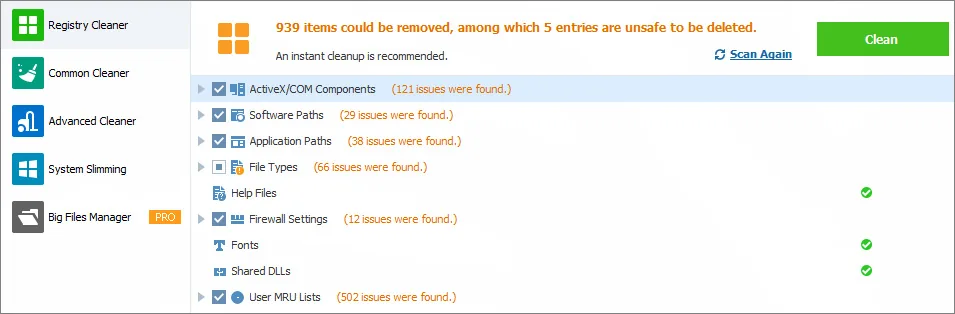
- Common cleaner. It cleans obsolete files, i.e. log files, thumbnails, Windows update files, browser cache files, browser history, cookies, temp files.
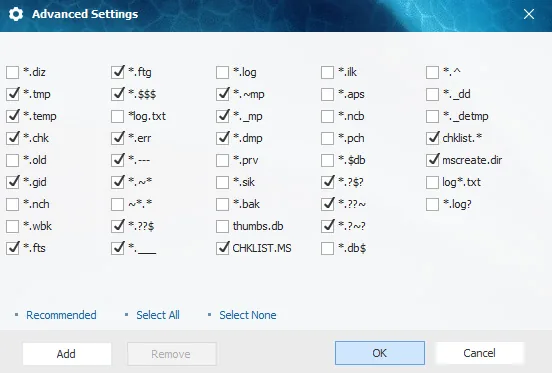
- Advanced cleaner. Helps to clear specific file types from specific drives. It supports 22 file types and marks files that can be deleted safely without affecting the OS.
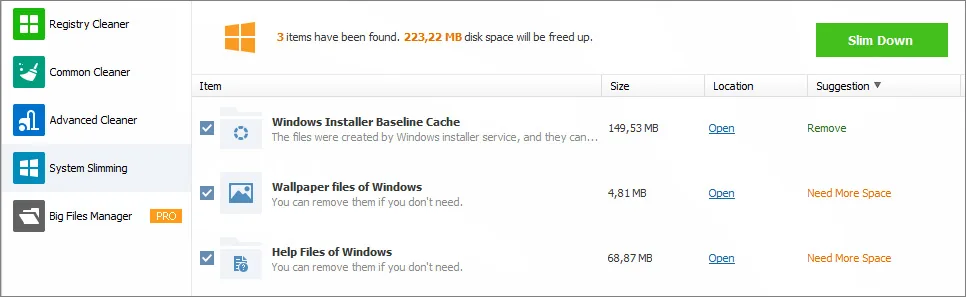
- System slimming. Removes unnecessary system files, for example, Windows installer cache, wallpapers, help files.
- Big files manager. Scans the system and detects specific system files larger than 10 Mb.
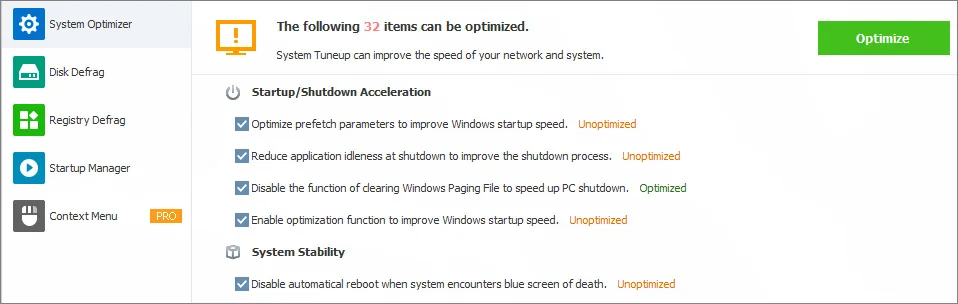
System Tuneup is the next section dealing with startup processes and defragmentation. System Optimizer tool is particularly useful in terms of acceleration and removing insignificant processes.
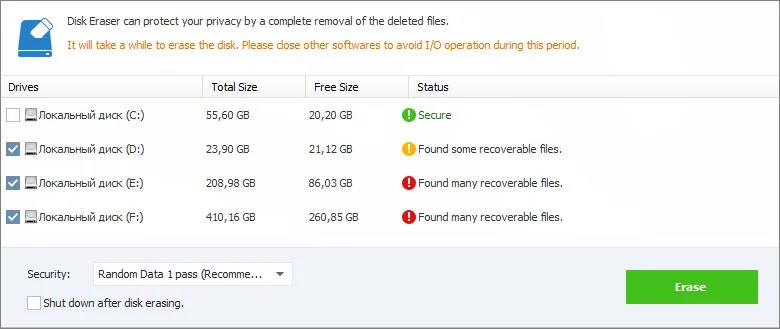
Privacy Protector tab offers tools to safeguard personal or sensitive data, generate strong passwords automatically, delete files permanently, etc. For instance, Disc Eraser reduces the risk of restoring deleted files by special software (find out more about Data recovery software). You can choose the specific type of erasing: Random Data 1 Pass, DoD 5220.22-M 3 passes, Schneier’s 7 passes, Gutmann 35 passes.
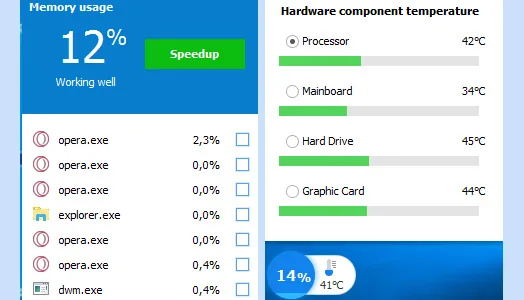
System Monitor is the last tab with tools to monitor running processes and hardware. It generates a complete list of the programs and processes, sorted by name, location, CPU usage, memory usage, and user. You also can stop any process. In regards to hardware, Wise Care 365 will help monitor the use conditions, load, temperatures of motherboard, graphic card etc.
Additional functionality. With Wise Care 365 Pro you get some additional functionality, as well as 24/7 technical support upon request. For instance, you will be able to use Privacy Eraser and Wise Protection tools, and not worry about data safety. 60 days money-back guarantee means that you can get your money back if you don’t like the utility or have trouble with it.
| Features | Free Version | Pro Version |
| One-click PC checkup | ✕ | ✕ |
| Clean & Speed-up | ✕ | ✕ |
| Hardware inventory | ✕ | ✕ |
| Privacy protection | No | ✕ |
| Real-time protection | No | ✕ |
| Auto clean in Silent Mode | No | ✕ |
| Faster startup speed | No | ✕ |
| Free up disk space | No | ✕ |
| Automatic updates | No | ✕ |
| Premium tech support | No | ✕ |
| Price | Free | $29.95 per 1 year |
User experience
Note: To test Wise care 365, and its PC Checkup in particular, we’ve used a computer with the following characteristics: CPU - Intel Core i5-9400 2.90 GHz, motherboard - MSI B360M Gaming Plus (MS-7B19), RAM - 16 GB, graphic card - Intel UHD Graphics 630, network adapter - Intel Ethernet Connection (7) I219 - V, sound card - Realtek.
System scan is very fast - only 4 seconds, during which the utility scanned 84 sections and found 4664 items to correct, optimize or delete.
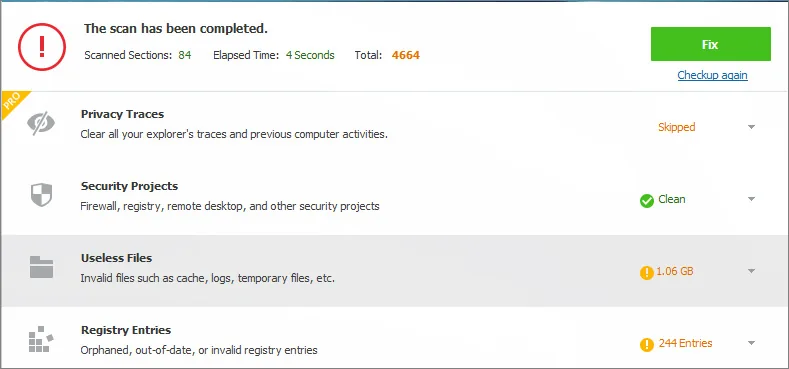
Results are grouped by subsections, which is quite convenient. You will be able to check all the information about any particular type of files, their number, and the amount of memory. For example, in our case, we found 1.06 GB of useless files.
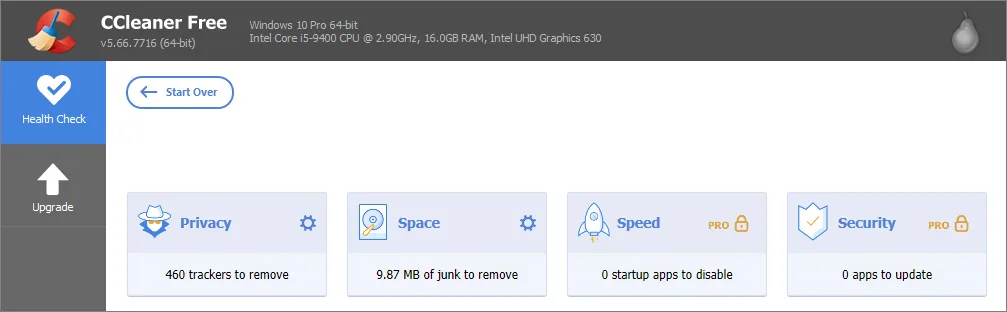
PC Checkup option only scans the system disk on which OS is installed, that is why it acts so fast. If we were to compare the same task performed by CCleaner, which is in the same software category, we’d find out that it highlights just 9.37 Mb of junk files on the same PC, while Wise Care 365 resulted in 1.06 Gb.
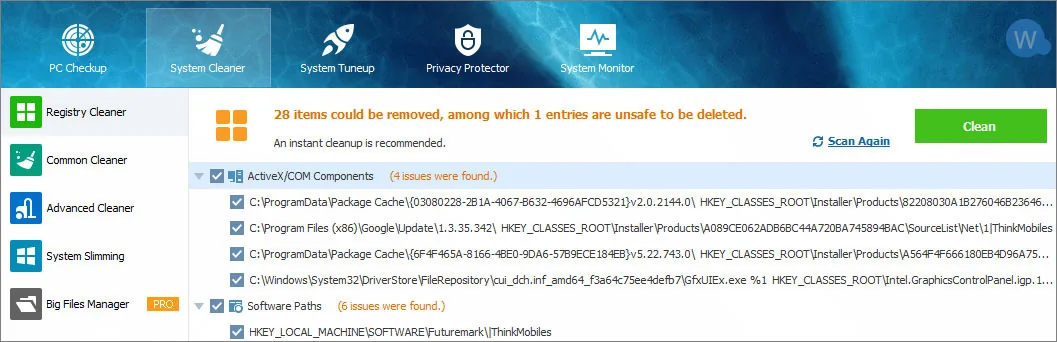
After that, we’ve moved on to the Registry Cleaner. The utility has detected 28 files that can be cleaned and 1 file that if deleted could negatively affect the operating system. For comparison, CCleaner detected the same number of errors.
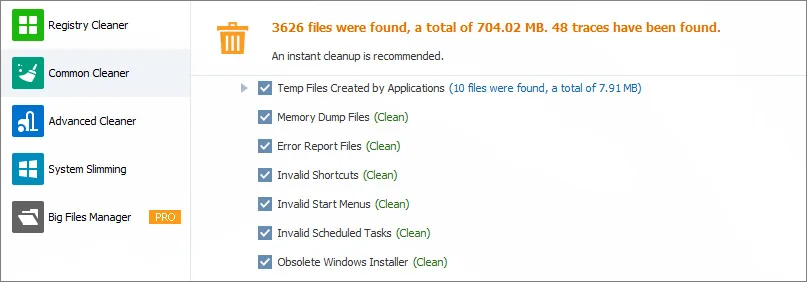
The full system scan resulted in 3,626 files, 704 Mb in size. CCleaner at the same time offered to get rid of 448 Mb of files. Generally the utility has proven to be handy and effective. There were no problems with scanning and system optimizing, all was working fine. Backup option is obviously a big plus.
Conclusion
Wise Care 365 utility has low system requirements, for disk space, RAM and CPU in particular. It performs well, has a nice interface. Developers deliver regular updates and fixes. Concerning numerous user complaints about upgrading, the vendor emphasizes that before installing a newer version, you have to delete the previous one. Wise Care 365 works on Windows OS only and this is one of its flaws. On the other hand, it offers a full free version.
Name of product Pros
- Consumes minimum system resources
- Well structured and easy to use
- Free version is properly working
- Multiple extra tools included
Name of product Cons
- For Windows OS only
- Technical support response is slow
- To upgrade one has to delete previous version
Alternative PC optimization programs:
- Auslogics BoostSpeed - optimize, speed up, protect and clean.
- IObit Advanced SystemCare - tune-up tool, security diagnosis, anti-malware, etc.
- System Mechanic - a set of utilities for optimization and fine-tuning of PCs.
- Avast Cleanup - speed up, system clean.
- 360 Total Security - free antivirus, optimize the system.
Read next: 12 free registry cleaner apps.
FAQ
What is Wise Care 365?
Wise care 365 is a utility to clean up, boost and optimize the operating system.
Who is the developer of Wise Care 365?
The developer of Wise Care 365 is WiseClean company, located in China.
How to activate Wise Care 365 Pro?
All the information about activation you can find on the official website of the developer.
Is Wise Care 365 good?
Wise Care 365 is suitable for any type of user. It will optimize and clear your operating system and keep your confidential information safe.
What is the latest version of the program at this moment?
At this moment the latest version is - 5.5.3.548 update April 16, 2020.
How many devices can I install Wise Care 365 on?
You are able to install the Free version on any number of devices. Pro version is limited to 3 PCs.
How much is Wise Care 365 Pro?
At this moment it costs $29.95.
Which operating systems are supported by Wise Care 365?
At this moment the utility supports Windows 10 / 8.1 / 8/7 / Vista / 2003 / XP 32 | 64-bit. Mac OS, Linux, and Windows RT are not supported.
How to update the program?
It should update automatically, but if not - do it manually. Use buttons in the upper side (Check for updates).
How to use Wise Care 365?
When launching the utility for the first time, we recommend starting with PC Checkup. It will scan and clean up the operating system. Then, discover additional features.
How to uninstall Wise Care 365?
To uninstall Wise Care 365, first close the program. After that you can delete it by using the Wise App Uninstaller or by Windows settings.
Is there Wise Care 365 for Android/iOS?
At this moment there is no version either for Android or for iOS.
Can I use Wise Care 365 on MacOS or Linux?
No, it only works in Windows OS.
Can I get Wise Care 365 portable?
You can make your utility portable manually. For this option you need to go Settings - General - Portable Version, and click the button called Make Portable Version.
Why should I purchase the Pro version?
If the security of data is essential for you, then this is the main reason to buy Pro. Also you will get a broader range of features.
Is Wise Care 365 a virus or malware?
No. Wise Care 365 is the utility for optimizing and cleaning a PC and also for prevention of harmful effects of viruses and malware.
How to apply real-time protection?
For applying the real-time protection feature, you need to buy the Pro version. After that the real-time protection will be activated automatically.
Wise Care 365 vs Ccleaner
Wise Care 365 performs a deeper analysis of the system and has a broader range of features than Ccleaner.
Wise Care 365 vs Advanced SystemCare
Wise Care 365 is more expensive ($29,95) but has fewer features. Advanced SystemCare costs $19.99 and offers features that allow capturing intruders automatically with FaceID, block malicious links and suspicious senders in web emails, and hide digital fingerprints.
Wise Care 365 vs System Mechanic
The functionality of both programs is very similar. System Mechanic is more expensive ($40), but has built-in antivirus and additional tools for system protection and the Internet connection optimization.
Wise Care 365 vs AVG Tuneup
The functionality of programs is different, and AVG Tuneup is more expensive, though it allows you to make program updates. Wise Care 365 has functionality for confidential information, whereas AVG Tuneup doesn’t.
Wise Care 365 vs Auslogics BoostSpeed
Auslogics BoostSpeed is more expensive but can optimize Internet connection and protect personal data via anti-tracker in a browser. Wise Care 365 doesn’t have this feature, but is cheaper.